


Instead of repeatedly walking back to check the picture, build a whelping box camera monitoring setup with a fixed view, tested phone access, and an on-site caregiver who can respond. This 2026 guide shows you how to arrange the camera, verify nighttime visibility, and use alerts without confusing remote viewing with newborn care.
- A whelping box camera monitoring setup supports hands-on newborn care; it never replaces an on-site caregiver.
- K9outdoors supplies dog gear; choose camera hardware separately and follow its setup instructions.
- Keep the entire whelping floor visible, with cords and mounting hardware outside the dogs’ reach.
- Test remote viewing and night vision before relying on puppy monitoring notifications.
Why this matters
A clear video feed helps you notice that a puppy has moved away from the litter, the mother is blocking your view, or bedding needs attention. It cannot confirm adequate milk intake, body temperature, or weight gain. Those checks require hands-on assessment and a care plan from your veterinarian.
K9outdoors is best for owners shopping for dog gear; newborn monitoring still requires a camera and an on-site caregiver. Start with a suitable enclosure rather than trying to make a camera compensate for one. The whelping box guide for first-time breeders addresses that separate decision.
For your 2026 setup, define the response before configuring alerts: who checks the feed, who physically attends the litter, and who calls the veterinarian. A notification without a responder is not a care system.
Before you start
- Camera and access: Have an indoor camera, its manufacturer’s app and instructions, the account owner’s login, a phone, and access to your home network. Confirm that the camera supports your network and the remote-viewing method you intend to use.
- Physical care materials: Prepare the whelping enclosure, secure mounting hardware, protected cable routing, suitable bedding, a thermometer, and a scale appropriate for puppies. Agree on warmth, weighing, feeding checks, and emergency contacts with your veterinarian.
- The setup gotcha: A picture that works on home Wi-Fi does not prove remote access works. Test over cellular data before depending on the feed, and remember that an internet outage can interrupt viewing without changing anything inside the box.
Keep a responsible person close enough to attend the mother and puppies promptly. During active labor or when a newborn is unwell, camera viewing is not a substitute for direct supervision.
Camera position and enclosure layout
Establish the fixed view
- Start with 1 fixed camera. Mount it outside the enclosure so the image includes the whole floor, the mother’s resting area, and the edges where puppies can disappear from sight. Use manufacturer-approved mounting hardware; do not balance the camera on the box rim.
- Route the power cable outside the enclosure and secure it away from chewing, pulling, bedding, water, and cleaning supplies. Keep the camera and its mount separate from any heat source.
- Check 2 viewing positions before settling on the mount: an elevated overview and an oblique view from outside the box. Choose the angle that reveals the floor rather than only the mother’s back.
- Have a caregiver stand where routine feeding checks and cleaning happen. Confirm that this movement does not knock the mount or pull the cable.
- Check the picture with the mother resting in her usual positions. If her body hides a corner, adjust the angle while another caregiver attends the dogs.
Expected result: The camera remains secure, all enclosure edges are visible when unobstructed, and no cable enters the puppies’ space. A mother lying over a puppy can still obstruct the picture; no viewing angle eliminates that risk.
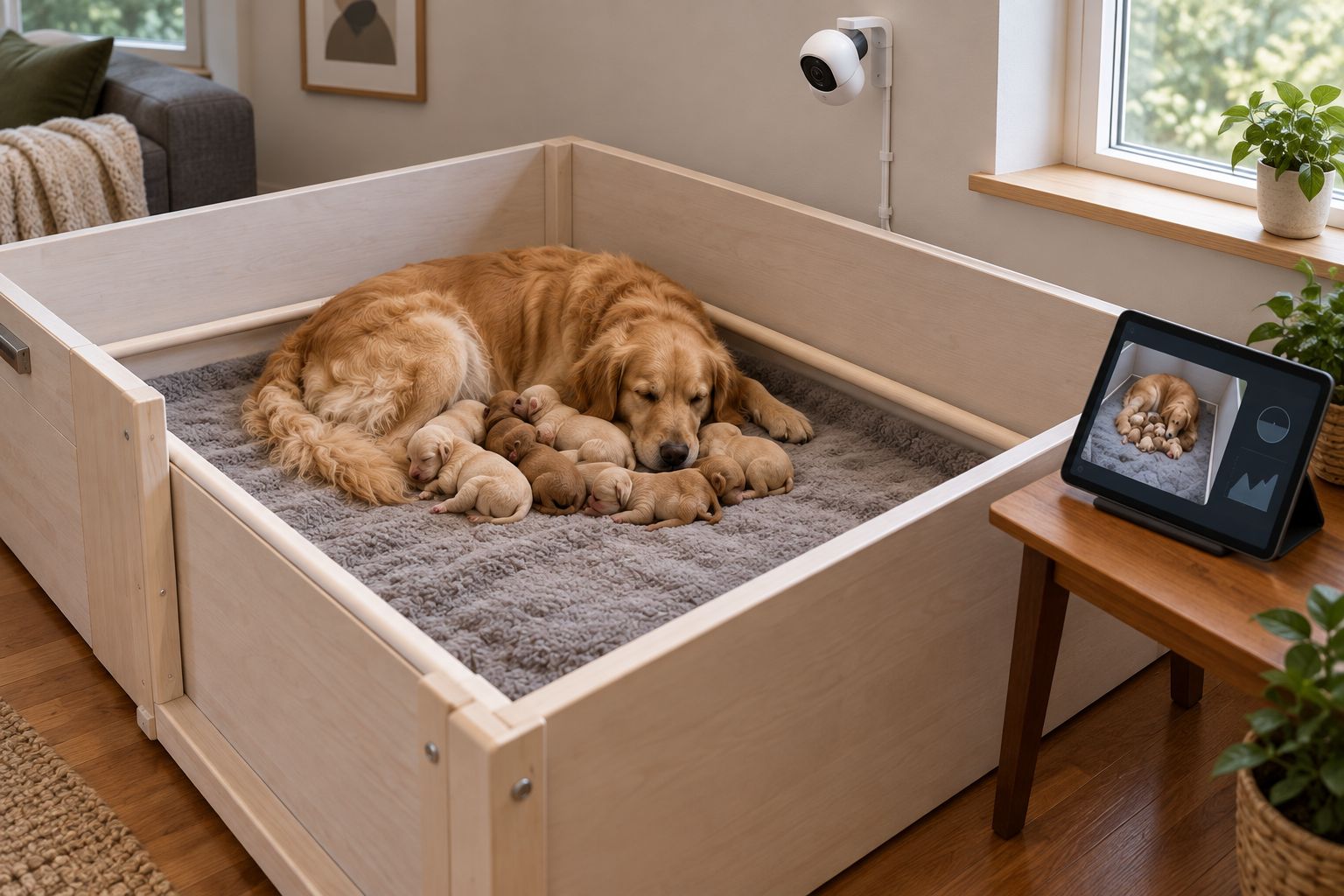
Choose enclosure accessories for care, not camera convenience
Window panels can help you see through an enclosure wall, but they do not guarantee a useful camera image. Reflections and the mother’s position still affect visibility. Select the enclosure for safe hands-on care first, then arrange the camera around it.
These K9outdoors whelping equipment options serve different jobs. Neither is a monitoring device. Confirm the appropriate enclosure and liner fit before choosing accessories.
| Equipment | Best for | Practical benefit | Limitation |
|---|---|---|---|
| EZclassic Windowed Whelping Box Set w/Rail Assembly | Owners choosing a windowed whelping enclosure | Window panels provide visibility into and out of the whelping area | Window visibility does not prevent camera blind spots |
| Liners for EZclassic Whelping Boxes | Owners selecting flooring for an EZclassic enclosure | Heavy-duty canvas flooring has a moisture-barrier treatment | A liner does not measure warmth or assess puppy health |
Treat flooring and the bedding above it as separate care decisions. Keep the surface arranged according to your veterinarian’s guidance, and inspect it directly rather than judging dryness from video.


Camera connection and private access
Connect and verify the live feed
- Install the manufacturer’s app from your phone’s official app store. Follow the camera’s documented pairing sequence and connect it to a supported network.
- Set a unique account password. Enable multifactor authentication if the camera service supports it, and install available firmware updates before placing the system into use.
- Open the live picture while connected to home Wi-Fi. Move your hand through the empty enclosure before the dogs enter, then confirm that the displayed movement matches what is happening.
- Turn off Wi-Fi on the viewing phone and repeat the check over cellular data. Verify that the feed is live rather than a saved clip or still image.
- Give another caregiver access through the service’s account-sharing feature if supported. Avoid sharing the owner’s password, and remove access when that caregiver no longer needs it.
Expected result: Authorized caregivers can open a current picture both inside and outside the home network. If cellular viewing fails, resolve remote access before treating the system as ready.
Camera apps do not share a universal set of button names. Use the exact pairing and sharing labels in your model’s instructions rather than following menus from a different brand. Never enable router port forwarding just to bypass an unexplained connection failure.
For a private 2026 setup, keep the stream restricted to caregivers. A publicly shared litter camera exposes the room as well as the puppies.
Night view and notification settings
Test visibility under real conditions
- Run the camera with the room lighting and veterinarian-approved heating arrangement you will actually use. Keep camera adjustments separate from changes to the puppies’ care environment.
- Check the feed after room lights are switched off. Look for glare from windows or clear panels, dark corners, and bedding that blends into the puppies’ outlines.
- If night vision reflects from a transparent panel, reposition the camera so the lens has a clear view rather than looking through that panel. Keep the mount outside the enclosure.
- Configure motion or sound notifications only if your camera supports them. Start with the manufacturer’s instructions; adjust the detection area to exclude unrelated movement outside the box where possible.
- Allow the camera app to send notifications in your phone’s settings. Check whether a quiet mode, sleep schedule, or battery-saving setting interferes with the alert you expect.
Expected result: You can identify the mother, the litter’s location, and the enclosure edges under nighttime conditions. A dark or overexposed picture fails this check even if the app reports the camera as connected.
Do not use motion silence as evidence that every puppy is safe. Small movements, obstruction, detection settings, and connection failures can all leave you without a useful alert. Keep scheduled hands-on checks independent of camera notifications.
Caregiver response and failure checks
Establish the alert-to-action routine
- Assign an on-site caregiver for each monitoring period. Record the backup caregiver and the veterinarian’s contact details somewhere accessible without opening the camera app.
- Agree on what requires immediate physical inspection: persistent crying, a puppy separated from the litter, trapping, an obstructed view, or a noticeable change in the mother’s behavior.
- Run 3 test events before relying on the workflow: movement in the empty box, remote viewing over cellular data, and a controlled camera power interruption. Perform these checks before puppies occupy the enclosure.
- Confirm what the app actually does when the camera loses power. If no offline warning arrives, write that limitation into the caregiver handoff rather than assuming one exists.
- Practice the response: open the feed, inspect the box in person, assess the dogs, and contact the veterinarian when indicated. Do not spend time replaying clips while a puppy needs attention.
Expected result: Every caregiver knows how to distinguish a viewing problem from a situation requiring immediate attendance. The routine still works when the phone, camera, or internet connection fails.
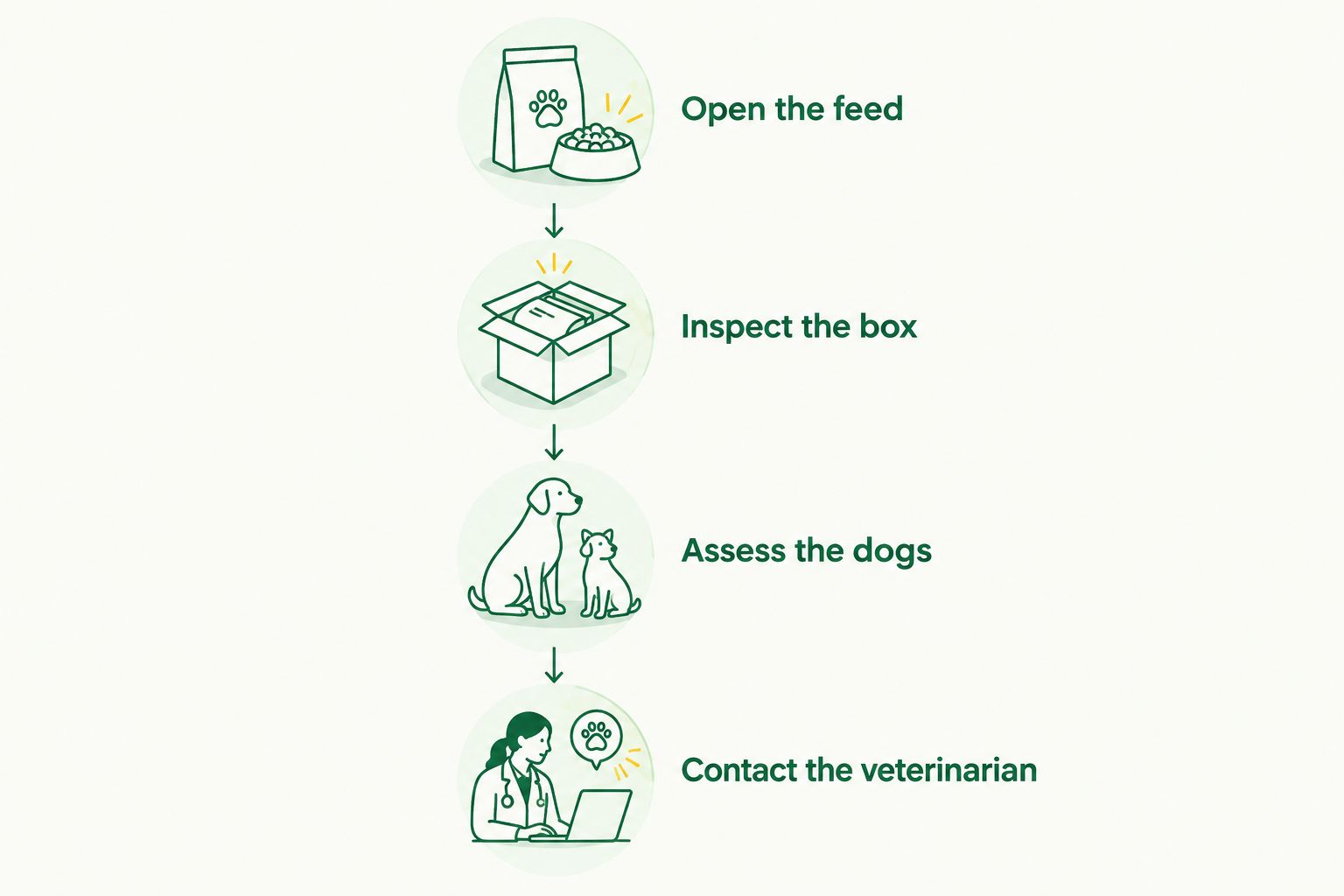
Your 2026 handoff should include the last direct check, any veterinary instructions, and unresolved concerns. A reassuring screenshot is not a substitute for that information.
Second workflow: review recorded events during caregiver handoff
Live viewing answers what is happening now. Recorded events can help an incoming caregiver understand what happened earlier, provided the camera supports recording and the footage is accessible.
| Workflow | Best for | Advantage | Limitation |
|---|---|---|---|
| Live viewing | A caregiver checking the current enclosure | Shows the present scene when the connection works | Does not explain activity outside the viewing period |
| Recorded-event review | A caregiver reviewing a reported incident | Provides footage to discuss during handoff | Event detection can miss activity; recordings are not health measurements |
Enable recording through your camera’s documented storage settings, then confirm that a test clip plays back. Check its timestamp against the actual time so caregivers do not mistake an earlier event for a current problem.
During handoff, describe the observation plainly: where the puppy was, what the mother did, and what the physical inspection found. Share relevant footage with your veterinarian through an agreed method when requested. Review recordings after urgent care, not before it.
Troubleshooting
- The feed works at home but not over cellular data. Check the camera service’s remote-access requirements, the phone’s cellular permission for the app, and whether the home internet connection is working. Use direct supervision until remote viewing passes its test.
- Night vision produces a bright reflection. Move the lens away from transparent panels and reflective surfaces. Recheck the entire floor without changing the care environment merely to improve the picture.
- Every movement creates another alert. Narrow the detection area if supported and adjust sensitivity according to the manufacturer’s instructions. Confirm that the revised settings still detect your test movement; fewer notifications are not automatically better monitoring.
- The mother blocks part of the litter. Reposition the external mount or inspect the hidden area directly. Add another view only if needed; another camera does not remove the need for attendance.
- A frozen picture looks like a sleeping litter. Check the live indicator or timestamp and test for current movement. Reopen the feed, inspect the box in person, and troubleshoot connectivity only after confirming the dogs’ condition.
Customize your workflow
Expand the system with a written care log, not just more camera features. Record veterinary-directed weighing, feeding observations, physical checks, and who completed them. Keep direct temperature measurements separate from anything inferred from the image.
Use this 2026 setup to support a quieter care routine: prepare clean materials nearby, arrange caregiver coverage, and keep emergency contacts accessible. Avoid adding toys, decorative bedding, or unfamiliar equipment simply because they look useful on camera.
K9outdoors outdoor dog gear serves a different stage from newborn supervision. Save travel and activity equipment decisions for when the dogs are developmentally ready and your veterinarian agrees.
FAQ
What is the best whelping box camera monitoring setup?
The best setup has a secure external camera, a clear view of the enclosure, tested remote access, and an on-site caregiver. Choose equipment around the care routine, not around the number of app features.
Can I leave newborn puppies alone if I have a camera?
A camera does not make it safe to leave newborn puppies without appropriate supervision. Keep a responsible caregiver available to attend promptly and follow your veterinarian’s guidance.
Where should I mount a camera for a whelping box?
Mount the camera securely outside the enclosure, with the floor and edges visible and cables out of reach. Check the view with the mother in her normal resting positions.
Do motion alerts tell me whether a newborn puppy is healthy?
No, motion alerts do not measure newborn health. You still need direct checks, veterinary-directed weighing, and assessment of feeding and warmth.
Why does my whelping camera look blurry or bright at night?
Reflections from clear panels or nearby surfaces can spoil a night-vision image. Reposition the lens for a clear view and verify the picture under your normal nighttime conditions.
Do I need two cameras to monitor a litter?
Start with one secure camera and add another view only if a meaningful blind spot remains. Multiple views still cannot replace physical inspection when the mother obscures a puppy.
What should I do when the puppy camera goes offline?
Inspect the mother and puppies directly before troubleshooting the camera. Restore the connection, verify a current image, and use direct supervision while remote viewing is unavailable.
One last thing
Check whether the picture is live before interpreting what it shows. During every caregiver handoff, verify the timestamp or live status, then complete the required direct check. For newborn monitoring in 2026, a current image is useful; an old image that looks current is a trap.